One document. Three formats.
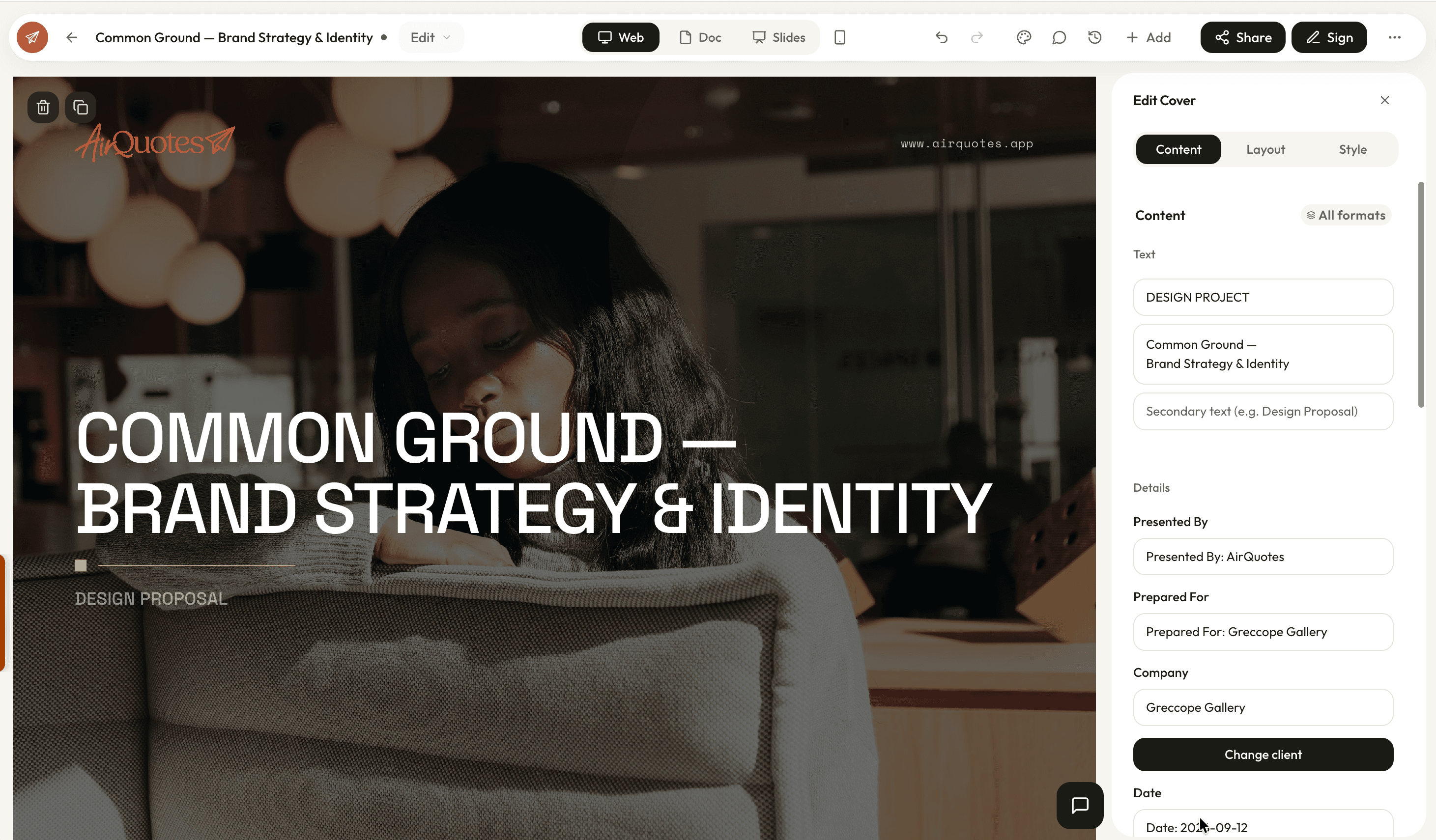
Proposals are built from blocks in a visual editor, and every proposal renders as a scrollable web page, an A4 print document with your letterhead, and a 16:9 slide deck, without rebuilding anything.
How it works
Start from a structure
A new proposal opens with the blocks in a working order: cover, project information, description, design process, scope, timeline, investment, about, team, next steps, terms.
Add, reorder, restyle
Pull any of the nineteen block types in from the library, drag blocks into the order you want, and pick a layout per block. Text edits happen in place.
Check all three formats
The preview switches between the scrolling web view, the A4 document and the 16:9 deck. Overflow and page breaks show up here rather than in a client’s inbox.
Send, or export
Share it as a live link, or export the document as a PDF or Word file and the deck as slides.
Nineteen blocks, and layouts inside them
A proposal is assembled from typed blocks rather than a blank page, so the investment table knows it is an investment table. The variation lives in the layouts each block offers.
- Cover, scope of work, timeline, investment, mood board, team, next steps, terms, signature and more
- Seven cover layouts, eleven for a text section, eleven for the investment table, eight for scope
- Scope can render as a simple list, a compact two or three column set, or a card per discipline
- Timeline renders as a Gantt chart, a list, a two-column list, or an alternating sequence
- Cover
- 7 layouts
- Scope of Work
- 8 layouts
- Text Section
- 11 layouts
- Investment Table
- 11 layouts
- Timeline
- 4 layouts
- Previous Projects
- 6 layouts
One document, three formats
The same proposal is a scrolling page for the client who opens it on a phone, an A4 document for the one who prints it, and a deck for the meeting where you present it. You build once.
- Online scrolls and adapts to the screen it opens on
- Document paginates onto A4 with your letterhead, page breaks and margins handled
- Presentation splits the content into 16:9 slides at 1920 by 1080
- A block can carry a different layout per format, so a three-column scope can go single-column in print
Editing that behaves
The parts of an editor you only notice when they are missing: undo that works, autosave that tells you it saved, and a warning before you close a tab with unsaved work.
- Drag to reorder, duplicate a block, delete a block, undo all of it
- Rich text in place, with bold, italic, lists and links
- Images from upload or stock search, with a focal point you set by hand
- Autosave with a visible status, and a prompt if you leave with changes pending
- Cover
- Editorial Masthead
- Scope of Work
- Discipline Card, two column
- Timeline
- Gantt Chart
- Investment Table
- Compact
- Terms & Conditions
- Summary Cards
Against building a proposal in a document editor
| What changes | Word or InDesign | AirQuotes |
|---|---|---|
| Starting a document | Duplicate the last one and strip it out | Blocks arrive in a working order |
| Changing the fee | Edit the table, then the summary, then the schedule | Edit the investment once; the schedule follows |
| A deck as well | Rebuild it in Keynote | The same document, switched to 16:9 |
| Fight the page breaks | A4 view shows the breaks while you edit | |
| Branding | Restyle each new file | Applied from the studio brand kit |
| Images | Source them elsewhere and place them | Stock search in the editor, focal point set by hand |
| Two people editing | Send versions back and forth | One document, edits saved as they happen |
Scroll the table sideways for the AirQuotes column.
What it does not do
It is not a page-layout tool
Blocks and their layouts are the unit of control. You are not dragging a text box to an arbitrary coordinate, and a proposal that needs that belongs in InDesign.
Three formats is a constraint, not a promise
Content that only works in one shape will look compromised in the other two. The per-format layout override exists because that happens, and it needs your judgement.
It does not design for you
The layouts are competent starting points. Choosing which one suits this client, and cutting the sections that are padding, is still the work.
Long proposals are still long
Nothing here makes a forty-page document persuasive. The editor makes it faster to produce, which is not the same thing.
Asked before you ask
How many block types are there?
Nineteen, covering the cover page, project information and description, design process, scope of work, timeline, investment table, mood board, previous projects, team, about us, text sections, image blocks, quote pages, numbered grids, next steps, terms and the signature block.
Do the three formats stay in sync?
Yes. There is one document underneath and the formats are views of it, so a change to a phase description appears in all three. Where a layout genuinely needs to differ, a block can hold a per-format override.
Can I export rather than share a link?
Yes. The document view exports as an A4 PDF and as a Word file with the tables and styling intact, and the presentation view exports as slides.
What happens to page breaks in print?
The A4 view paginates as you edit, so a block that would split across a page break shows that while you are working rather than after you export.
Can two of us work on the same proposal?
Yes. Work saves as it happens with a visible status, and you get a warning if you try to leave with changes still pending.
Where do the images come from?
Upload your own, or search stock photography without leaving the editor. Any cropped image lets you set the focal point yourself, so a face or a building does not get cut in half by a different aspect ratio in another format.
See it on your next proposal.
Beta access is free for two months on the Studio plan. Applications are reviewed manually, and approved studios build their first proposal from their own brief.
Apply for beta →