Paste the call notes. Get a structured draft.
Drop in a client call transcript, a brief, or raw meeting notes. AirQuotes detects your discipline and returns a draft with phases, deliverables, scope, pricing options, and add-ons already filled in.
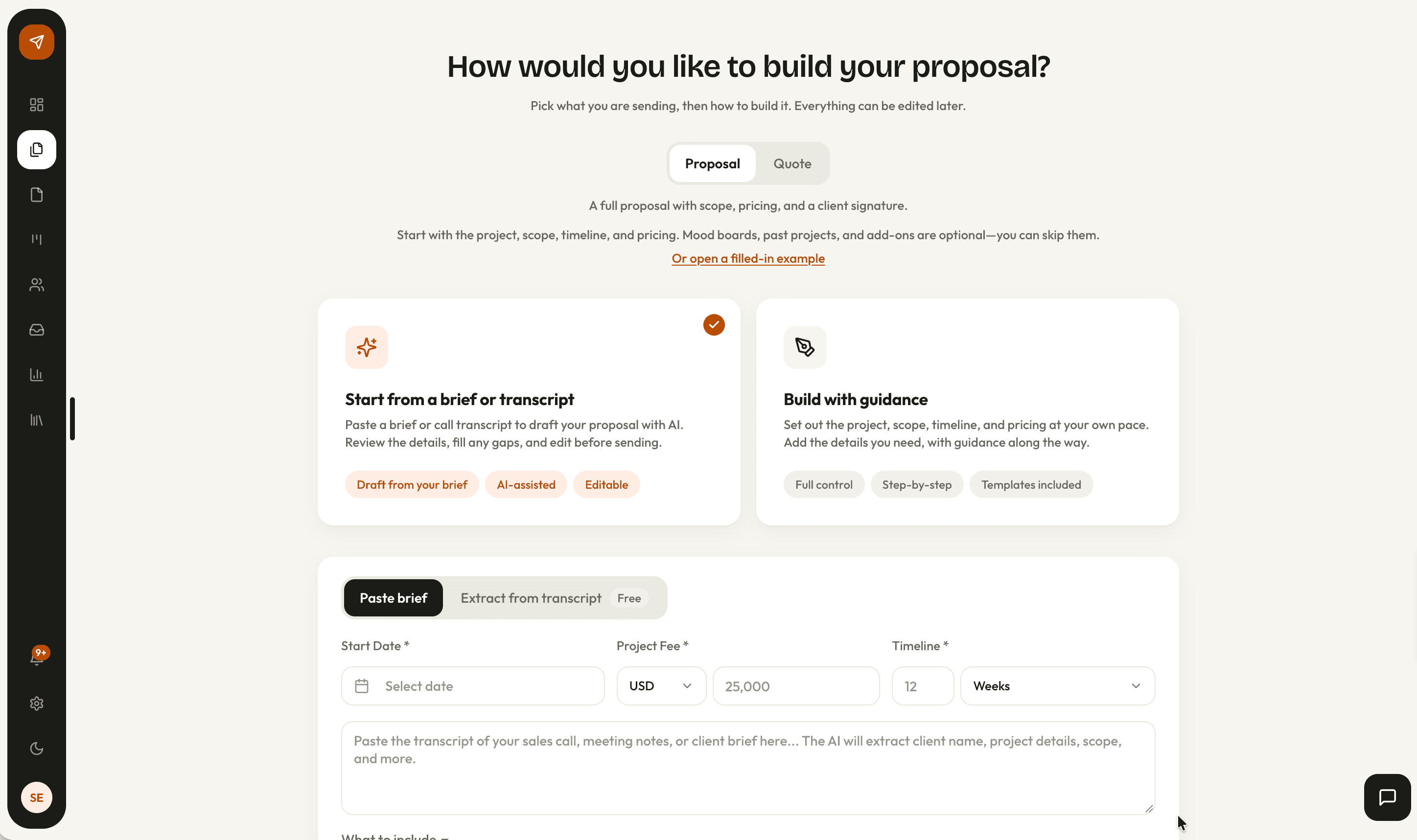
How it works
Paste the notes
A call transcript, a written brief, or raw meeting notes, up to 5,000 characters. That covers a call of about fifteen minutes.
Set the fee and the timeline
A start date, an estimated fee, and an estimated timeline are yours to enter. Neither total is ever taken from the notes.
Generate
AirQuotes reads the discipline out of the work being described and returns a proposal structure to match.
Review every step
The draft opens in the wizard with every phase, fee, deliverable, and date editable. Nothing reaches a client until you send it.
What comes back from a set of notes
The generation returns a proposal structure rather than a block of prose, and each field lands on the wizard step that owns it. The draft opens with the work already distributed across the document.
- A cover page with the project title, the client, and your studio
- A scope paragraph, the client’s objectives, their constraints, and why the project is happening now
- Phases carrying a description, a one-line version of it, an outcome, a duration, a fee, and named deliverables
- A payment schedule, next steps, and three stock image searches matched to the project
… they want the logo and wordmark, colour palette, business cards done first. Budget is around £18k. The shop opens in spring so we’re looking at about four months, and payment in two milestones if possible.
- Discipline
- Brand Identity
- Deliverables
- Logo and wordmark, colour palette, business cards
- Stated budget
- £18,000
- Milestones
- 2
- Site address
- Not mentioned
Where the numbers come from
The total fee and the total timeline are yours, typed into the form. The transcript supplies the shape of the work inside them: per-phase durations wherever the client named them, and per-phase fees weighted by how much work each phase actually is.
- Phase fees sum to the total you entered, weighted by duration, deliverable count, and where the value sits
- An even split across phases is treated as a failure rather than a fallback
- The milestone count follows what the client asked for, so “two or three milestones” produces two or three
- The first milestone triggers on signing and the rest on delivery
- Discovery & immersion15%2 weeksOn signing
- Visual exploration30%3 weeksOn delivery
- Identity design35%4 weeksOn delivery
- Guidelines & rollout20%3 weeksOn delivery
Options and add-ons stay separate
A call that compares packages and a call that mentions an extra piece of work produce different structures, because the client is answering different questions. An option asks which version of the job to buy, and an add-on asks whether to buy a further piece of work at all.
- Two to four pricing options, told apart by the phases each one excludes
- Add-ons for anything priced on top, or labelled optional, phase two, or nice to have
- An add-on carries its own phases and durations, so it lands on the timeline if the client takes it
- Retainer language such as monthly, ongoing, or maintenance produces a recurring line instead of a one-off fee
The gaps stay gaps
Anything the notes do not mention is left empty. A draft that reads as finished while inventing the client’s constraints costs more to correct than one with visible blanks in it.
- Where a phase description did not come from the call, your own library copy is used instead
- Deliverables keep the client’s wording rather than being swapped for an industry-standard list
- No date outside the schedule window can appear in the copy, and a client deadline that falls outside it is filed as a constraint
- A design process you have written yourself is never mixed with drafted text
From call notes to a first draft
| What changes | By hand | AirQuotes |
|---|---|---|
| Getting to a draft | An afternoon moving notes into last month’s document | One generation, then editing |
| Phase structure | Copied from the previous proposal and renamed | Written per phase, each with an outcome and a duration |
| Per-phase fees | Split by feel, often evenly | Weighted to the work, summing to your total |
| Payment schedule | Written out again each time | Built from the phase fees and the client’s stated preference |
| The client’s own words | Paraphrased from memory a week later | Deliverable names kept as they were said |
| What the call never covered | Filled with template copy nobody rereads | Left blank, or filled from your content library |
| Dates | Checked by hand against the schedule | Held inside the schedule window |
| Options and extras | Restructured manually per version | Separated into priced tiers and declinable add-ons |
Scroll the table sideways for the AirQuotes column.
What it does not do
It does not price the work
The fee is the one you type into the form. The phase fees only distribute it, so a total that is too low produces a schedule that is wrong all the way down.
It does not check the client
Nothing said on the call is verified against anything. A budget mentioned in passing becomes a figure in a document you are accountable for.
It cannot recover what was never said
A five-minute call produces a thinner draft than a transcript carrying scope and constraints, and no amount of regenerating changes that.
It does not sign anything off
Every generated proposal needs reading before it goes out. The draft is a starting position, and the document that reaches the client is yours.
Asked before you ask
How long can the notes be?
The paste box holds 5,000 characters, roughly fifteen minutes of talking, and the counter turns amber as you approach it. For a longer call, the Extract from transcript tab gives you a prompt that reduces a full transcript to seven labelled fields: client, project, discipline, budget, timeline, scope, and context. Run it in the AI tool you already use, then paste the seven fields back.
What if the call barely touched on budget?
Any signal is enough. “Around $25k” reads as 25,000, “$25–30k” as the midpoint, and “budget is 30” as 30,000. What the client said is kept separately as their stated range, and the estimated fee you enter in the form is the number the phase fees actually sum to. Where no figure was mentioned at all, the field stays empty.
Does it pick the right discipline?
It selects one of the seven, and picks more than one only where the work genuinely spans two. The discipline and its phases are yours to change on step two of the wizard, so a wrong call costs you one dropdown rather than a restart.
What happens if a generation fails?
A failed generation does not count against your monthly allowance. Neither does one that stops because a fee or a timeline is missing.
How many generations do I get?
Five a month on Free, thirty on Solo, and 150 on Studio. The allowance belongs to the studio rather than the individual, so on Studio it is shared across the team, and the counter reads “x of y used this month” beside the paste box.
Can I generate a quote instead of a full proposal?
Yes. Choose Quote before pasting and the same notes fill a five-step document covering project, scope, timeline, pricing, and terms, rather than the eleven-step proposal.
Is the transcript stored?
AirQuotes keeps the proposal the generation produced, not the notes it came from. The text you paste is not written to your studio’s records.
See it on your next proposal.
Beta access is free for two months on the Studio plan. Applications are reviewed manually, and approved studios build their first proposal from their own brief.
Apply for beta →