From approved to signed, in the same link.
A two-signer flow captures the studio signature and the client signature on the proposal or quote itself, with a signed PDF and a signing certificate to download when both are in.
How it works
Enable signing on the proposal or the quote
Sign in the editor toolbar turns it on for either kind of document. What is there is snapshotted at that moment and fingerprinted, so what gets signed is fixed and cannot drift while it sits in an inbox.
The client signs first
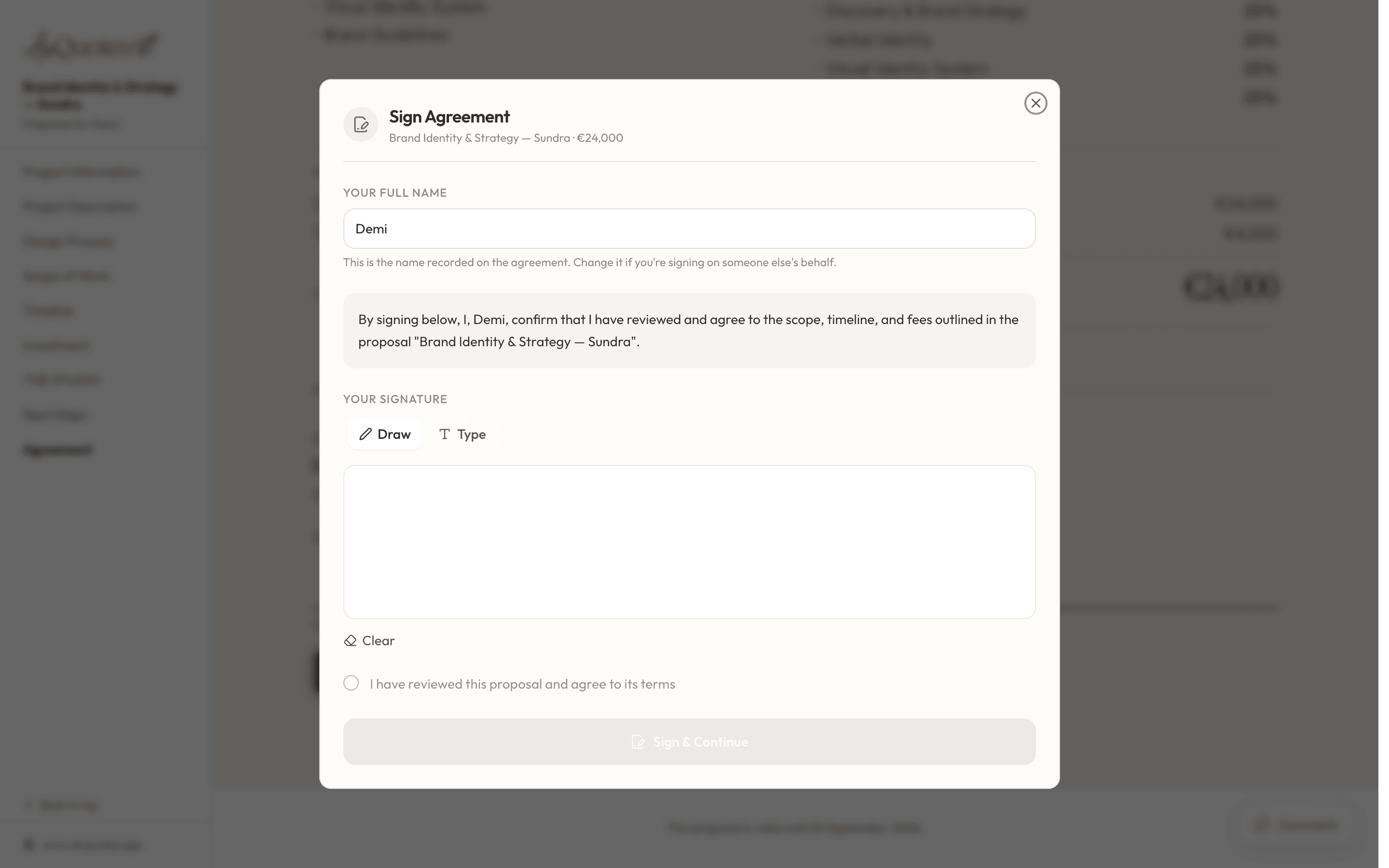
On the same link they have been reading. They accept the consent text, then draw or type a signature. Nothing is countersigned before this.
You countersign
The studio signature becomes available once the client has signed. Two parties, in that order, on the same document.
Take the signed record
A signed PDF and a certificate of the signature events, both kept with the project.
What gets recorded per signature
A signature on its own proves very little. What makes it defensible is the record around it: who, when, from where, what they agreed to, and how they signed.
- The signer’s name as they typed it, and the signature image itself
- Whether it was drawn or typed
- The timestamp, the IP address and the browser it came from
- The exact consent text shown, and the moment it was accepted
- Signer
- Melissa Cope
- Method
- Drawn
- Signed
- 17 Apr 2026, 14:22
- IP
- 81.103.4.22
- Consent
- Accepted 14:21
Order, and a fixed document
The client signs before the studio, and the document is frozen before either of them does. A proposal that could still be edited between the two signatures would not be worth much as a record.
- A snapshot PDF is taken and fingerprinted when signing is enabled
- The studio countersignature is unavailable until the client has signed
- An independent e-signature service witnesses both signatures and holds the audit trail
- The signed PDF is produced once both parties are in
- 1Signing enabledThe document is snapshotted and fingerprinted
- 2Client signsConsent, then a drawn or typed signature
- 3Studio countersignsOnly available once the client has signed
- 4Signed PDF issuedWith the certificate of both signature events
When the scope changes first
Deals move. A signing request that no longer matches what was agreed is worse than no signing request, so an in-progress one can be pulled.
- Void a signing request before the client signs, if the scope has moved
- Correct the proposal and send it for signature again
- The client is notified when the studio countersigns, so nobody is left checking
- Free includes two signings a month across proposals and quotes; every paid plan is unlimited
- 1Sent for signature14 Apr
- ×Voided by the studioScope changed before the client signed
- 3Corrected and reissued16 Apr
- 4Signed17 Apr, both parties
Against a separate signing tool
| What changes | Print, sign, scan | AirQuotes |
|---|---|---|
| Where the client signs | A different app, after a different email | The link they were already reading |
| What they sign | A PDF exported by hand, possibly the wrong version | A snapshot taken and fingerprinted at enable time |
| Order of signatures | Whoever gets to it first | Client, then studio countersignature |
| The audit record | A scan of a signature | Name, method, time, IP, browser and consent text |
| Where it ends up | A downloads folder | Attached to the project |
| Scope changed mid-flight | Ask them to ignore the last email | Void it and reissue |
Scroll the table sideways for the AirQuotes column.
What it does not do
It is not legal advice
Electronic signatures are recognised in most jurisdictions, with exceptions and formalities that vary. Whether this is the right instrument for your contract is a question for a lawyer, not for us.
It does not verify identity
The record shows that someone at a given address accepted the terms and signed. It does not prove they are who they say they are, or that they had authority to sign.
It does not chase
A proposal can sit unsigned indefinitely. Analytics will tell you it has been open for nine days with no decision; the follow-up is yours to make.
A signature is not a deposit
Signing marks the proposal as accepted. Invoicing and payment happen in whatever you already use for that.
Asked before you ask
Does the client need an account?
No. They sign on the shared link, in the browser, with no sign-up. They accept the consent text and then either draw a signature or type their name.
What stops the document changing after it is signed?
Enabling signing takes a snapshot of the proposal as a PDF and stores a fingerprint of it. That snapshot is what the signatures attach to, so later edits to the working document cannot alter what was signed.
Can the studio sign first?
No. The client signs and the studio countersigns, in that order. The countersignature is not available until the client’s is in.
What if the scope changes before they sign?
Void the signing request, correct the proposal, and send it for signature again. That is better than letting a client sign a version you have already moved on from.
What do I get at the end?
A signed PDF and a certificate documenting the signature events: who signed, when, by what method, from what address, and the consent text each party accepted. Both stay with the project.
How many signatures are included?
Two signings a calendar month on Free, counted across proposals and quotes together. Solo, the Studio plan and Office are unlimited.
Can a quote be signed, or only a proposal?
Either. Turning signing on from the quote editor locks the quote and adds an Agreement section at the end of the shared web quote, where the client signs. The studio countersigns from the editor, and both sides download the signed PDF and the audit log, exactly as on a proposal.
What happens on a quote that offers options?
The client picks an option before the Sign button becomes available, so the signature attaches to a chosen price rather than a menu. If the quote has passed its validity date, signing closes and the client is offered "Ask the studio" instead.
See it on your next proposal.
Beta access is free for two months on the Studio plan. Applications are reviewed manually, and approved studios build their first proposal from their own brief.
Apply for beta →