Enter your website. Your branding is set.
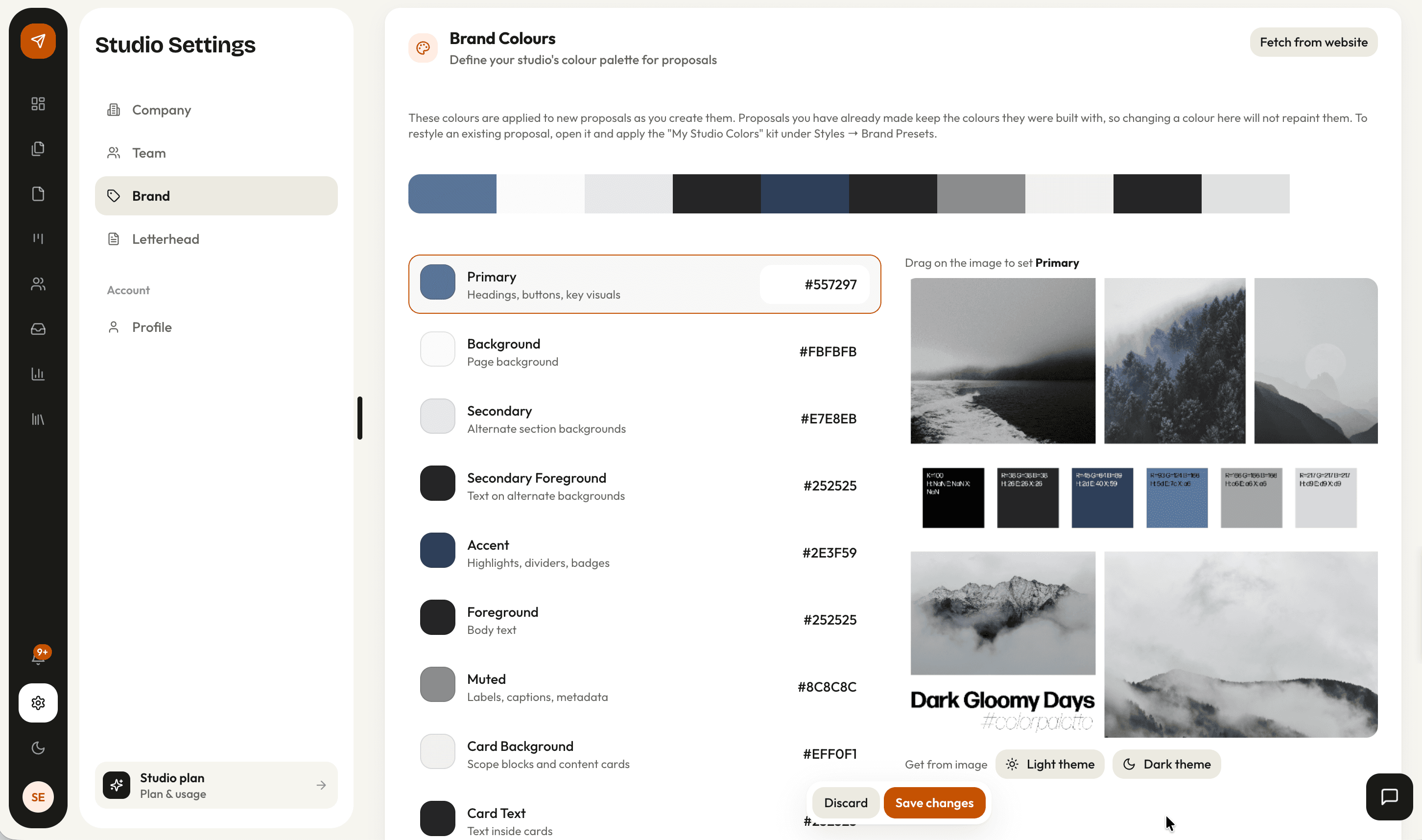
Brand Fetch reads your studio website and extracts your color palette, logo, typography, and studio details, mapped and ready to apply. Every proposal you make carries them from then on.
How it works
Paste your studio URL
Brand Fetch reads the page and pulls out what it can find: a colour palette, logo candidates, the heading and body typefaces, and your studio details.
Check what it found
Colours arrive mapped to roles rather than as a pile of hex codes, and logo candidates are ranked. You confirm or correct before anything is applied.
Apply it to the studio
The kit is saved once per studio: colours, three typography slots for headings, body and labels, and your name, address and contact details.
Design the letterhead
Set the header and footer for the A4 view, in minimal, standard or detailed. Every proposal in every format carries the kit from then on.
What Brand Fetch reads
A studio website already carries the brand. Rather than asking you to type hex codes, the fetch reads the page and proposes a kit you correct rather than build.
- A palette mapped to accent, background, foreground and card roles
- Logo candidates, weighted toward images the page itself marks as a logo
- Heading and body typefaces, matched against the families available in proposals
- Studio name, address, phone and contact details for the cover and letterhead
yourstudio.com
- Accent
- #C55200
- Heading
- Bricolage Grotesque
- Body
- Outfit
- Logo
- 2 candidates found
The kit that every proposal inherits
Branding is a studio setting rather than a per-proposal one, so a change to your accent colour reaches the next proposal without anyone remembering to apply it.
- Primary, secondary and accent colours, plus background, foreground, card and text
- Three typography slots: headings, body and labels, each with size, weight and spacing
- Six built-in brand kits if you would rather start from one: Editorial, Warm Neutral, Slate, Classic, Forest, Modern
- Per-block colour overrides for the one section that needs to break the pattern
Imagery, without leaving the editor
Most of what makes a proposal look like your studio is not the logo. It is whether the images are yours, cropped properly, and relevant to the project in front of the client.
- Stock photography search inside the editor
- Suggested searches per project, drawn from the brief rather than the discipline
- A focal point picker, so a crop keeps the part of the image that matters
- Background images with overlay, fit and position controls
- Source
- Stock search
- Suggested for
- Cafe interior, timber, warm light
Getting a proposal to look like your studio
| What changes | By hand | AirQuotes |
|---|---|---|
| Setting up branding | Restyle a document and hope the next one matches | Fetched from your site, saved once per studio |
| Colour | Pasted hex codes, drifting between files | Mapped to roles and applied everywhere |
| Typography | Whatever the last template used | Three slots, set per studio |
| Letterhead | A header you paste into each new file | Configured once, applied to the A4 view |
| Rebrand | Every template updated by hand | Change the kit; new proposals follow |
| Image crops | Whatever the aspect ratio decides | A focal point you set |
Scroll the table sideways for the AirQuotes column.
What it does not do
The fetch is a proposal, not an answer
It reads a public web page. A site built as one large image, or one behind a login, gives it very little to go on, and what it does find still needs your eye on it.
It cannot match every typeface
Fonts are matched against the families available in proposals. A licensed display face used only on your website will be approximated rather than reproduced.
A brand kit is not a brand
Colours and type make a proposal recognisably yours. They do not make it well designed, and a bad layout in the right palette is still a bad layout.
It does not retro-apply
Changing the kit affects proposals from that point on. A document already sent to a client stays as the client saw it, which is usually what you want.
Asked before you ask
What if Brand Fetch gets it wrong?
Everything it finds is shown for review before it is applied, and every value stays editable afterwards. It is quicker to correct two colours than to enter nine.
Can I skip the fetch entirely?
Yes. Six brand kits are built in, and you can set colours and typography by hand. The fetch exists to save the setup, not to gate it.
Where does the brand kit apply?
Across all three formats: the online view, the A4 document and the presentation. The letterhead is specific to the document view, where a header and footer make sense.
Can one proposal look different from the rest?
Yes. Colours can be overridden per block, and a proposal can carry its own design settings when a particular client or project calls for it.
What are the letterhead options?
Minimal, standard or detailed, which control how much of your studio detail appears in the header and footer of each A4 page.
See it on your next proposal.
Beta access is free for two months on the Studio plan. Applications are reviewed manually, and approved studios build their first proposal from their own brief.
Apply for beta →